
Tablе of Content
With Apple devices, even an ordinary evening can turn into an exciting adventure. The iPad’s large touchscreen is perfect for strategy games, the iPhone is ideal for gaming on the go, and the MacBook is great for longer gaming sessions. Apple Arcade is now included with an iCloud+ subscription, giving you access to more than 200 games without ads or in-app purchases. In Armenia, you can buy smartphones, tablets, and laptops for gaming at iSpace.
What Games Are Available on Apple Devices?
MacBooks, iPads, and iPhones are excellent for gaming. Their key advantages include:
- powerful chips that can run even demanding games smoothly;
- large, bright displays that make fine graphical details and dark scenes easy to see;
- hardware-accelerated ray tracing that makes reflections, shadows, and lighting more realistic;
- long battery life for extended gaming sessions on laptops, smartphones, and tablets.
Smartphones are no longer limited to mobile games — you can now play classic PC titles on them, too. Through Apple Arcade, you can download sports simulators and enjoy exciting matches in Football Manager 26 Touch and NBA 2K26 Arcade Edition, or dive into thrilling adventures in Sonic Dream Team.
Apple Arcade — A Gaming Subscription Service
Apple Arcade is a gaming subscription service that offers unlimited access to a library of more than 200 games across various genres. The collection includes:
- new releases;
- award-winning titles;
- popular games from the App Store.
The App Store offers both free and paid games, each of which must be downloaded separately. Apple Arcade, on the other hand, has no ads or in-app purchases. Previously, access to its game library required a separate monthly subscription, but that changed in September 2026. Now, Apple Arcade is included with an iCloud+ subscription. Apple TV, featuring a collection of Apple Originals movies and series, is also part of the updated plan. With Family Sharing, you can share your subscription with up to five other people.
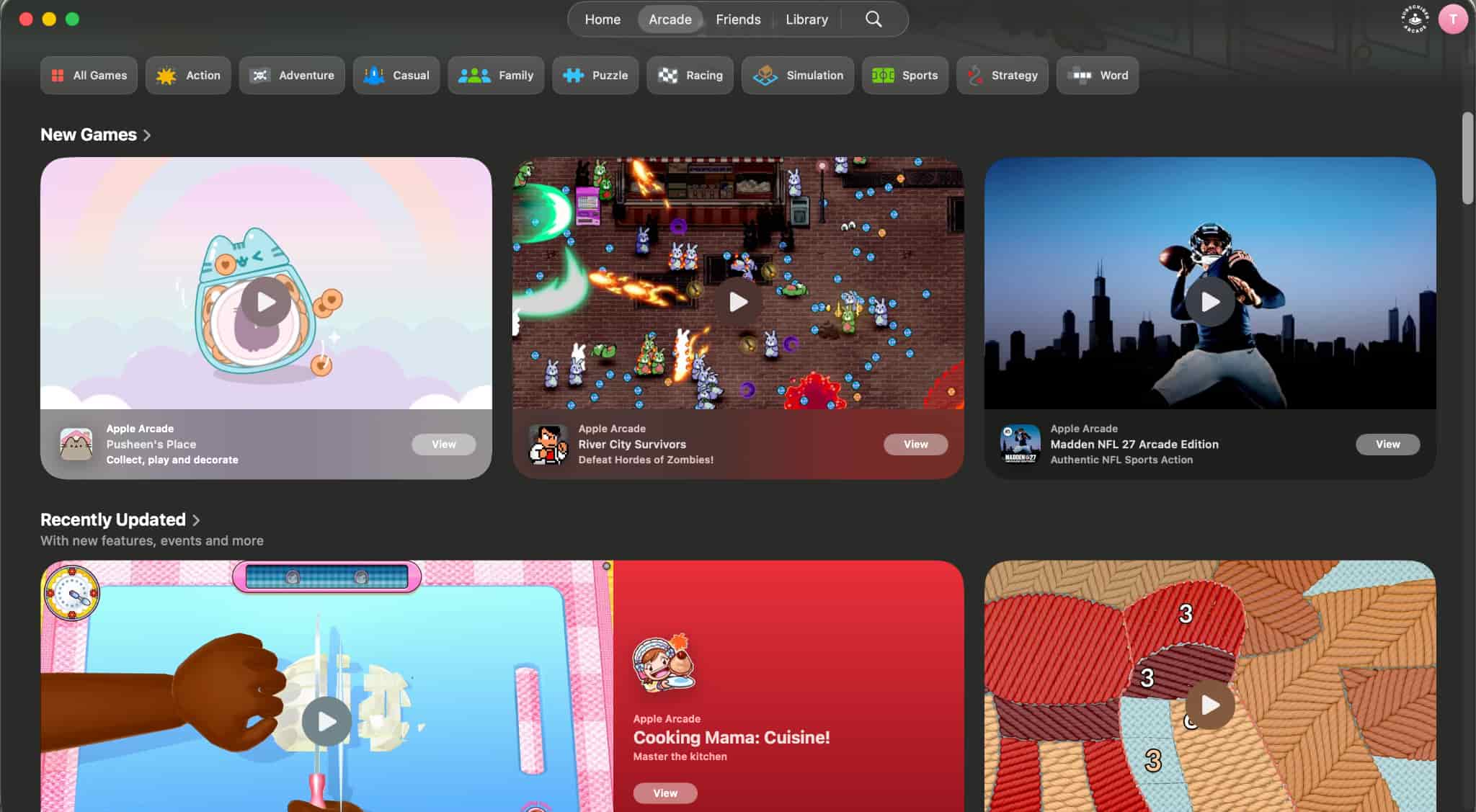
The Arcade Originals category features games created specifically for the service and available on Mac, iPhone, iPad, and Apple TV 4K. Some standout titles include Sneaky Sasquatch, Sonic Dream Team, and Hello Kitty Island Adventure. In the App Store Greats section, you’ll find popular games from the App Store, such as Monument Valley+, Fruit Ninja Classic+, and Chameleon Run+.
Some games can be played offline, which is especially convenient when traveling or dealing with an unstable internet connection. Your progress syncs the next time you connect to the internet, and iCloud lets you continue playing on another device using the same Apple Account.
How to Download Games on iPhone or Mac
Before downloading games on your iPhone or Mac, make sure your iCloud+ subscription is active and includes access to Apple Arcade. Your device should also be running the latest version of iOS or macOS. Follow these steps:
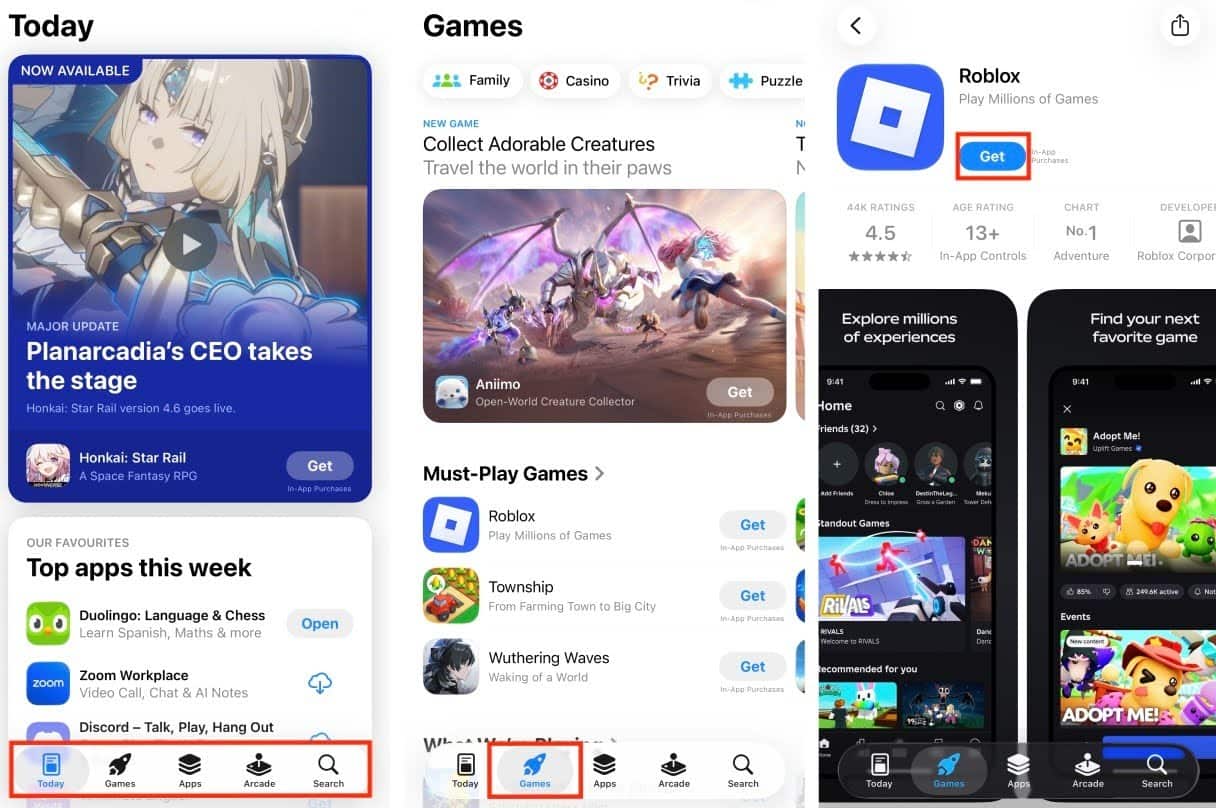
- Open Apple Games or the App Store.
- Go to the Arcade tab, choose a game from the recommendations, or find one using the search feature.
- Check the game details, including device compatibility and whether it supports a game controller.
- Tap the download button and wait for the installation to finish.
- Once installed, you can find the game in your Apple Games library.
To play across multiple devices, install a compatible version of the game on each one and sign in with the same Apple Account. You’ll need iCloud and an internet connection to sync your game progress.
Which Apple Device Should Gamers Choose?
If you’re looking for a powerful phone for gaming, consider the latest iPhone models. For example, the iPhone 18 Pro can handle demanding games, while its upgraded cooling system helps dissipate heat more efficiently under heavy workloads. ProMotion technology with a refresh rate of up to 120Hz ensures smooth visuals. Plus, your smartphone is always with you, so you can play on the go, at a café, or between classes.
An iPad with a screen ranging from 8.3 to 13 inches is ideal for strategy games, RPGs, and other titles where a larger display makes a difference. iPads support gaming controllers, while the iPad Pro with the M5 chip features a 10-core GPU and hardware-accelerated ray tracing. You can also use your tablet for gaming, then switch to work or enjoy a movie.
If you prefer playing with a keyboard and mouse, consider a powerful laptop for gaming. For example, the MacBook Pro with M5 Pro offers:
- a GPU with up to 20 cores;
- a Liquid Retina XDR display with ProMotion up to 120Hz;
- an active cooling system;
- a six-speaker sound system.
Everything you need for gaming is already built in: a large display, a keyboard, and high-quality sound, so there’s no need for a separate monitor or speakers.
| Device | Popular Supported Games |
| MacBook | NBA 2K26 Arcade Edition
DREDGE+ Fruit Ninja Classic+ |
| iPhone | Fruit Ninja Classic+
NBA 2K26 Arcade Edition Sonic Dream Team |
| iPad | Fruit Ninja Classic+
NBA 2K26 Arcade Edition Hello Kitty Island Adventure |
Ultimately, the iPhone is convenient for gaming on the go, the iPad offers more touchscreen space, and the MacBook is ideal for those who want to combine gaming with work or studying.
Apple Devices for Gaming at iSpace
You can buy an iPad, iPhone, or Mac for gaming at iSpace, an Apple Premium Reseller in Armenia. We offer only genuine Apple devices with an official manufacturer’s warranty.
Our experts will help you decide which laptop is best for gaming. You can try out devices and pick up your purchase at our stores in Yerevan. If you’d rather shop from home, simply place an order online, and we’ll deliver it quickly and with care. To make your purchase even more affordable, take advantage of our installment plans or financing options. You can also join the iSpace Community to stay up to date with our exclusive offers and latest news.
FAQ
What Is Apple Arcade?
Apple Arcade is a gaming subscription service that gives you access to more than 200 games without annoying ads or in-app purchases. To enjoy cloud storage, all the benefits of the gaming service, and an Apple TV subscription, sign up for iCloud+.
Which Apple Device Is Best for Gaming?
Choose a device based on your favorite games and preferred controls. The iPhone is convenient for gaming on the go, the Mac is ideal for longer sessions with a keyboard and mouse, and the iPad offers more space on its touchscreen.
How Do You Download Games on iPhone?
First, make sure your iPhone is running the latest version of iOS. Open the Arcade tab in the App Store or Apple Games, then choose and download the game you want.
Which iPhone Is Best for Gaming?
The iPhone 18 Pro is a great choice for fast-paced games. It’s designed to handle demanding workloads over extended periods, thanks to its powerful A20 Pro chip and upgraded vapor chamber cooling system. If you’re still unsure which phone is best for your gaming needs, the iSpace experts can help you choose.
What Games Are Available on Apple Arcade?
The service’s library includes strategy games, sports simulators, RPGs, puzzles, and many other genres. Some of the most popular titles include Sonic Dream Team, NBA 2K26 Arcade Edition, and Fruit Ninja Classic+.
Check out more
10 Movies to Warm You Up This Fall: What to Watch Tonight?
iPhone Duo: Specifications of Apple’s First Foldable iPhone
Always be aware!
Subscribe to the newsletter and be the first to know about new promotions and special offers