
Tablе of Content
The smart assistant makes life easier for owners of iPhones and other Apple devices. With its help, you can control devices and apps, send messages, and create notes. In this article, we explain how to use Siri commands on your iPhone effectively to save time.
What Can Siri Do in 2026?
In 2026, the smart assistant has access to messages, emails, documents, and the calendar. It can see everything happening on the screen. The more often you give voice commands to Siri, the better it interacts with you — the assistant is constantly learning.
Before using it, set up the assistant: in Settings, select the relevant section (also called “Apple Intelligence & Siri”) and set a trigger phrase — each request will start with it.
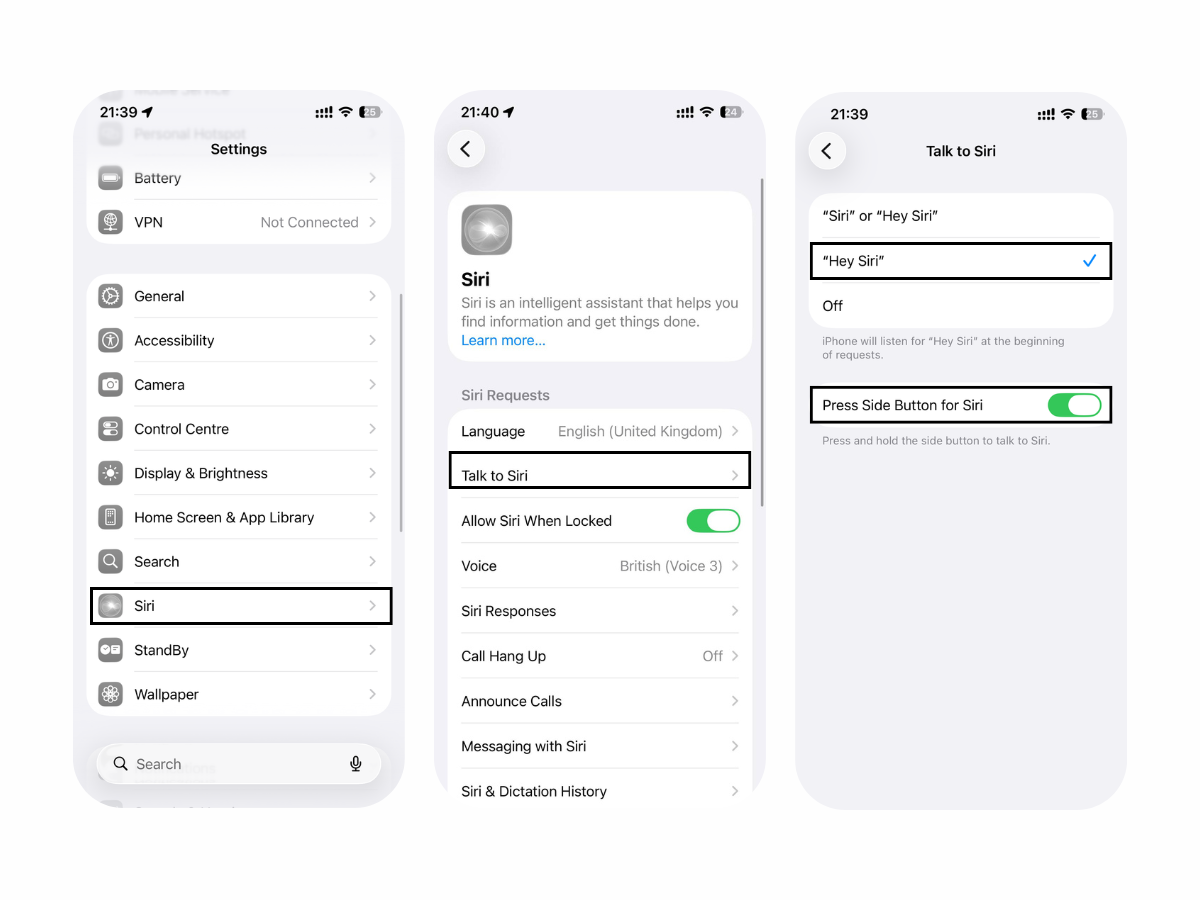
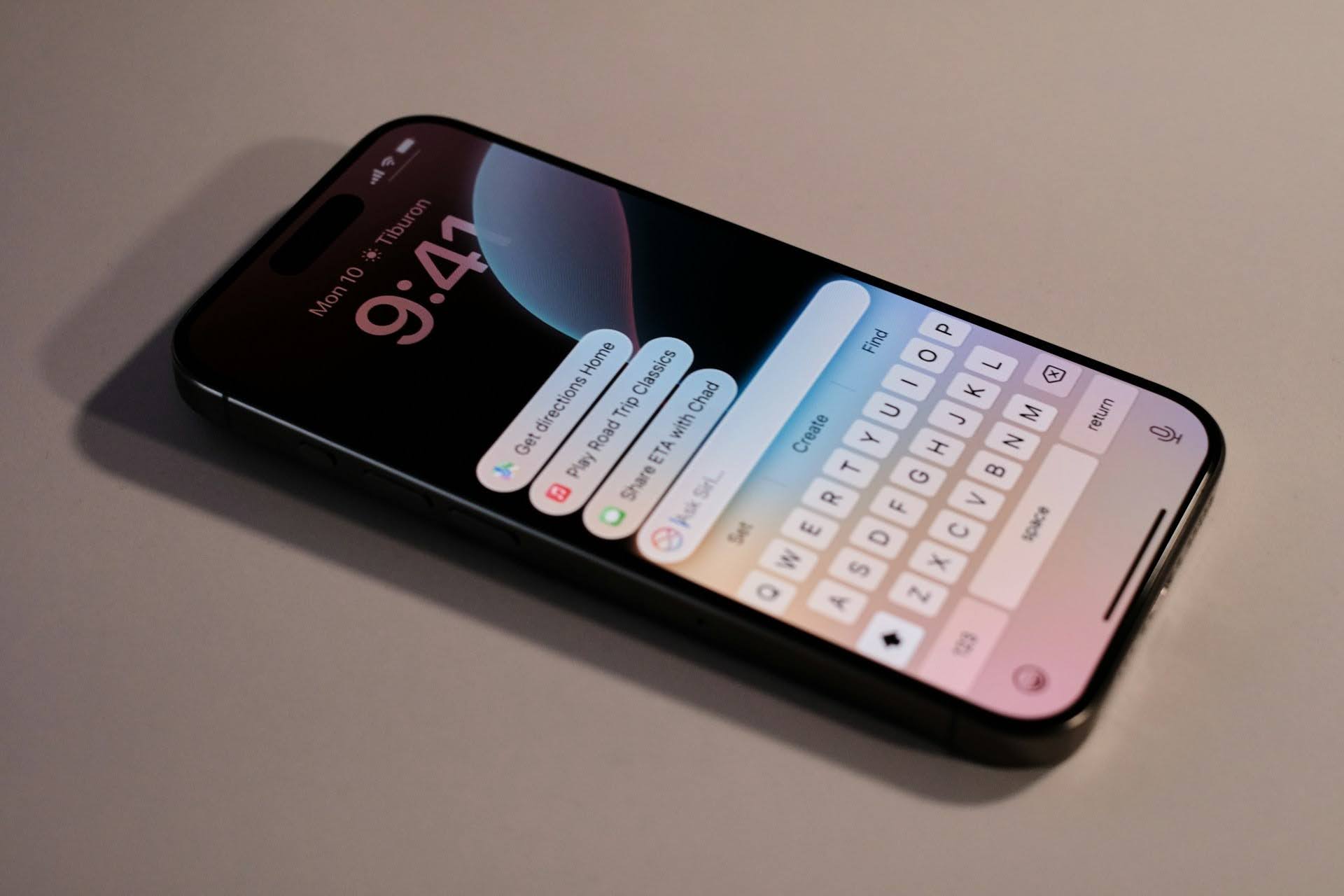
Then simply say this phrase or press the button to activate the assistant. You can also give commands by typing: using enabled AI (double-tap at the bottom of the screen) or through Accessibility options. Siri features may vary depending on the country and language.
Quick Reminder
Use voice commands to create reminders. For example, “Remind me to call work in an hour” or “Remind me to feed the cat at 3:00 PM.”
Add a To-Do List
To add a to-do list, use the Reminders app. You can create a task with a simple phrase like “Create a list and add these items.” For example, this is useful for making a shopping list.
How to Control a Smart Home with Siri: Lights, Outlets, Climate, and Scenes
The intelligent assistant, together with the Home app (Apple HomeKit), controls smart devices.
The assistant can:
- turn devices on and off using smart outlets (“Turn off the garland,” “Turn on the kettle”);
- choose settings (“Turn on the living room light at full brightness,” “Set the temperature to 18 degrees”);
- check the home status (“Are the doors locked?”).
You can set up scenes and launch them with one phrase. For example, say, “I’m home,” and the assistant will turn on the hallway light and switch the thermostats to a comfortable mode.
Find a Device
Use Siri commands to find lost devices — it is convenient when you cannot locate them in a room. The assistant will activate a sound signal on them. But first, you need to enable the Find My app — there is already a blog article about this.
Passwords
If you need to access saved passwords from Keychain, ask the smart assistant to find them. It will open the “Passwords & Accounts” section, and then you will need to copy the data from there.
Turn Off an Alarm
You can turn off an alarm by voice without unlocking your iPhone. If there is only one active alarm, say, “Turn off the alarm”; if there are several, be more specific: “Turn off the six AM alarm.”
Weather
You can quickly find out the temperature outside — activate the assistant and ask the question you need. It uses data from the Weather app.
Useful Siri Commands for Travel and Foreign Languages
The smart assistant is useful for local navigation, currency conversion, and finding locations on maps, such as the nearest coffee shop. Quick translation is also helpful. For example, you can ask, “How do you say ‘Where is the hotel?’ in Spanish?”
Siri and Apps
The smart assistant can control apps. Just make a request so it can suggest a movie, play music, or launch a game.
Apple Intelligence Features
Apple Intelligence improves the assistant’s performance. When paired with AI, Siri can:
- recognize context and keep the conversation going;
- redirect requests to ChatGPT to provide a more expert answer;
- understand what you are showing on the screen;
- process complex commands for managing settings.
AI does not support Russian. However, it can be used in English.
Top Useful Siri Commands for iPhone
Among the most useful commands are information searches (“Where is the nearest gas station?”), time and reminder management (“Wake me up in 40 minutes”), and communication (“Call my brother”). With AI support, the assistant can also create files and search for information through ChatGPT.
Siri and Other Apple Devices
Owners of almost all devices in the Apple ecosystem can use Siri features. They are supported on desktop computers, laptops, tablets, watches, and headphones.
If you have questions about using the smart assistant, you can get help from the experts at iSpace — an Apple Premium Reseller in Armenia. By the way, in our physical stores in Yerevan and in the online store, you can upgrade your Apple gadgets at pleasant prices.
FAQ
Can Siri be used in Russian?
Yes, select “Language” in the settings and set the one you need. The smart assistant also supports English, Spanish, and other languages. However, AI does not support Russian.
What interesting commands does Siri know?
Siri turns on the flashlight with the “Lumos” command and turns it off with “Nox.” You can also ask it to flip a coin and get heads or tails as the result.
How should you give Siri commands so it understands you the first time?
Speak naturally, but without unnecessary details. First, say what needs to be done, then add the details: “Set an alarm for seven in the morning.”
Does Siri work without the internet?
The intelligent assistant can work offline on devices with iOS 15 and later. However, the functionality is limited to changing settings, using apps, and performing other similar tasks.
What can Siri do with Apple Intelligence?
Apple Intelligence helps perform commands based on previous requests, analyze context, and get information about devices in the ecosystem.
Always be aware!
Subscribe to the newsletter and be the first to know about new promotions and special offers