
Tablе of Content
If maximum data protection and privacy matter to you when using a smartphone, you can confidently choose an iPhone. iPhone security is a defining feature of this device lineup. Users’ personal information is reliably protected from malware and unauthorized access.
Why Is iPhone Security a Key Advantage?
The closed iOS ecosystem tightly controls both software and hardware. Only verified apps are allowed into the App Store, which significantly reduces the risk of viruses and spyware. In addition, iCloud cloud storage uses encryption during both data transfer and storage.
Biometric authentication through Face ID protects Apple Pay and app data, while two-factor authentication for Apple ID adds an extra layer of security.
iPhone Privacy And Apple Data Protection
Privacy in smartphones from the American brand is built on multi-layered security features. These include:
- data encryption systems;
- access control via Face ID;
- two-factor authentication;
- passcodes and passwords;
- advanced iCloud options;
- private access features.
Apple’s developers take data privacy extremely seriously.
Apple’s Approach To Privacy: What Is Stored Locally And What Goes To The Cloud
The most sensitive data is stored directly on the iPhone in the Secure Enclave and never uploaded to the cloud. This includes biometric data and payment information, on-device content analysis, and private browsing data.
The cloud stores information required for data synchronization, such as contacts, notes, photos, and passwords, as well as backup copies.
A hybrid approach is often used when processing requests for Apple Intelligence. For example, when you ask to rephrase text or process an image using AI, the information is sent to the cloud to complete the task and is deleted immediately after the response is delivered.
Tracking Control And App Permissions
iPhone uses a privacy permission system that lets you decide which apps can track your activity and access device features. iOS displays app requests and applies the settings you choose. Here’s how it works, as you can:
- see which apps request access to data and device features;
- decide whether to grant permission;
- change tracking permissions at any time in Settings.
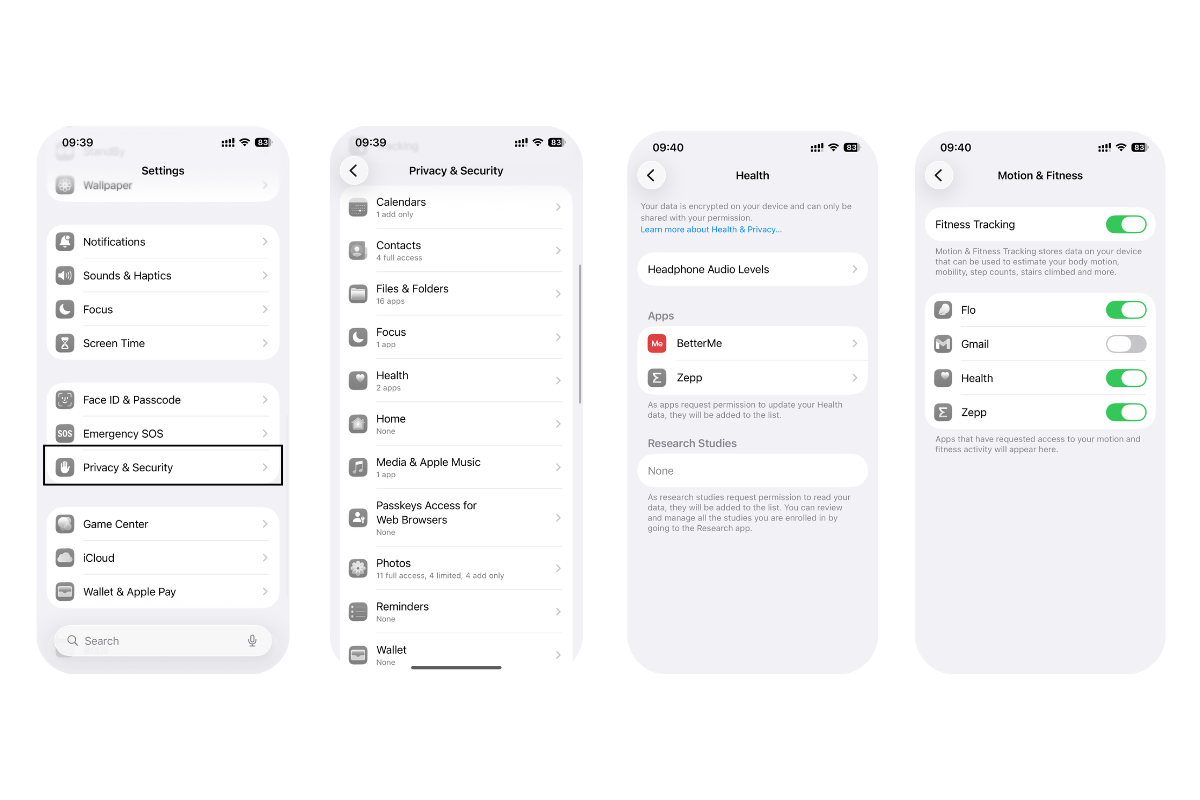
You can manage third-party app access to information on your iPhone whenever you want. To do this, open Settings, select Privacy & Security, tap a data category (for example, Calendar), and view the list of apps that have been granted access.
Protection Of Messages And Calls
iMessage conversations and FaceTime calls are protected with end-to-end encryption. Standard SMS, MMS, and cellular voice calls are encrypted at the carrier level.
App Store And Apps: How Apple Protects Against Viruses And Malware
The App Store is Apple’s official app marketplace. Before any new app is published, it is thoroughly reviewed to prevent the distribution of malicious code. All apps available there go through strict moderation.
iOS itself also relies on built-in security mechanisms. For example, apps run in a sandbox environment and are granted only the permissions they declare and that the system explicitly allows.
Security Tools For Users
The operating system includes built-in security features that help protect your data. These include:
- a Security Check in Settings that allows you to quickly revoke data access across all devices;
- Stolen Device Protection, which makes it harder to access passwords, cards, photos, and other sensitive information;
- Lockdown Mode, which secures critical data by restricting most system features.
Apple devices are considered among the most secure smartphones on the mobile device market.
iPhone Security Vs Android
In practice, iPhone offers strong protection against external threats. This is due to its closed ecosystem, regular updates, and strict App Store control. On Android smartphones, security largely depends on the manufacturer, update policies, device model, and user behavior. However, the final level of protection is strongly influenced by the work of developers.
How To Improve iPhone Security: A Settings Checklist
Although the brand’s ecosystem is well protected, you should also follow basic digital hygiene rules. We’ve compiled the most important ones:
- use strong passwords that combine letters and numbers;
- enable Face ID;
- use two-factor authentication;
- regularly update iOS to patch vulnerabilities;
- avoid clicking on suspicious links.
You can buy Apple devices in Armenia at iSpace with nationwide delivery or at physical stores in Yerevan, where all current products are available for hands-on viewing. We offer original devices, and our experts will help you choose and set up a gadget according to your needs.
FAQ
How Secure Is iPhone Compared To Other Smartphones?
Apple devices are often more secure than other smartphones. This is due to the closed ecosystem, where the manufacturer controls both software and hardware.
Can Apple Read My Messages Or See My Photos?
Apple cannot view your photos. This is ensured through end-to-end encryption and the company’s privacy policies.
Is My Data In iCloud Secure?
Your cloud data is well protected. By default, a standard security level is used, but you can enable advanced protection options.
What Should I Do If My iPhone Is Stolen, Can Someone Access My Data?
If your phone is lost or stolen, enable Lost Mode via Find My from another device. This disables payments, locks the screen, and allows you to leave a message for whoever finds the smartphone.
MORE ON THE TOPIC
iPhone 17 Pro vs iPhone 17 Pro Max: Is It Worth Overpaying?
Why Are iPhones Called “Camera Phones” And How Is Their Camera Different From Other Smartphones?
How to Find the Perfect Case and Screen Protector for Your iPhone: An Overview
Apple iOS 26: Top Features in the Latest Update
How to Choose an iPhone in 2026: Series Overview
Always be aware!
Subscribe to the newsletter and be the first to know about new promotions and special offers