
Tablе of Content
- 1 Why Apple Watch Can Be Found Using iPhone
- 2 What You Need to Make Search Work
- 3 How to Find an Apple Watch When It’s Nearby
- 4 What to Do if the Smartwatch Is Far Away or Discharged
- 5 Finding a Lost Apple Watch Through an iPhone Without a Connection
- 6 Tips and Mistakes When Finding an Apple Watch Through iPhone
- 7 How to Effectively Find an Apple Watch Through an iPhone?
- 8 FAQ
To make sure losing your Apple smartwatch does not cause stress, the developers included effective tools in the system settings. With their help, finding a lost device is simple. In this article, we explain how to find an Apple Watch using an iPhone.
Why Apple Watch Can Be Found Using iPhone
Apple devices are designed to work within a unified ecosystem. The smartwatch and the smartphone connect easily via Bluetooth. A lost device can be located using the Find My app — read more about this tool in our blog.
When the Apple Watch is turned on, it regularly sends an encrypted location signal. If both devices use the same Apple ID, the location can be viewed on the map from the iPhone. For this to work correctly, the required settings must be enabled.
What You Need to Make Search Work
To make it easier to find devices in the future, activate the Find My app. Follow these steps:
- Sync Apple Watch and iPhone via Bluetooth.
- Open Settings on Apple Watch.
- Sign in to your account.
- Scroll down and select your device.
- In the Find My menu, tap Find My Network.
After activation, you will be able to see the smartwatch location on the map.
How to Find an Apple Watch When It’s Nearby
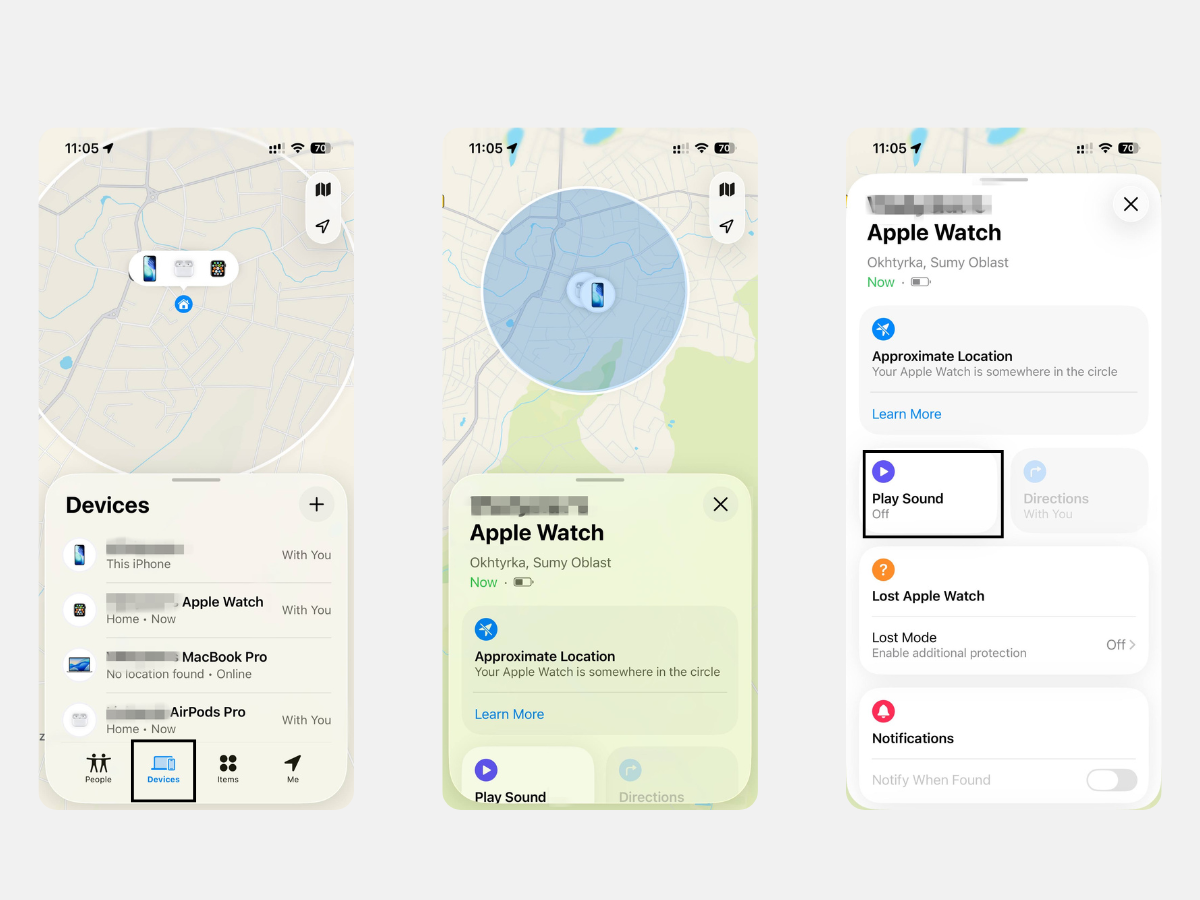
If you are sure the device is somewhere nearby, use the sound signal. This option helps find the watch faster at home, in the office, or in the car. The function works when the smartwatch is connected to Bluetooth or Wi-Fi.
To activate the sound, follow these steps:
- Open the Find My app on your iPhone.
- Find the Devices tab and open it at the bottom of the screen.
- Select your Apple Watch from the list of devices.
- Tap the Play Sound button.
The smartwatch will emit a loud sound, and its volume will gradually increase. The signal can be heard for two minutes. To stop it, use the corresponding option on your iPhone or on the watch display.
What to Do if the Smartwatch Is Far Away or Discharged
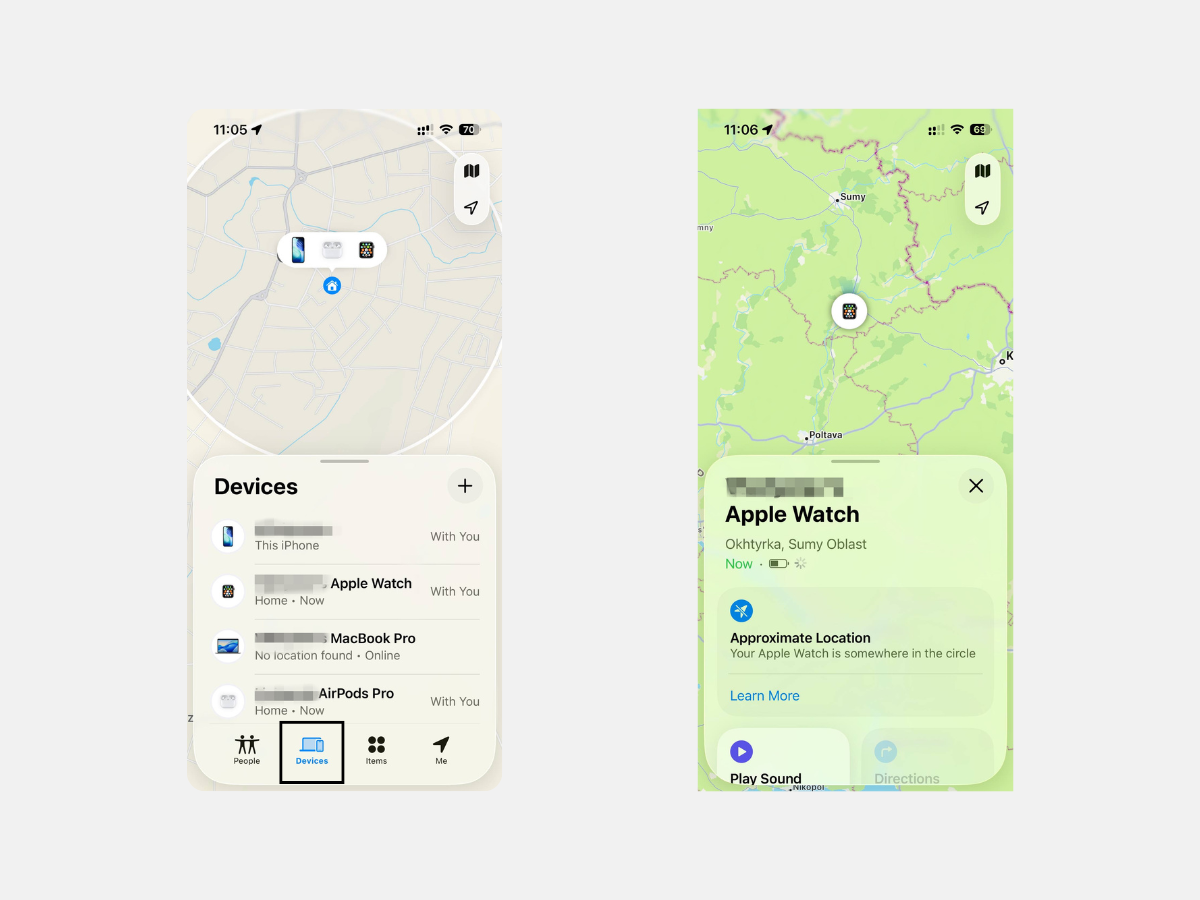
If the device was lost outside the home or its battery has already run out, you can still check where it was last detected. Open the Devices tab in the Find My app and select the needed device from the list. After that, a map with its last known location will appear.
If you went to the location and did not find the device there, lock it using the Activation Lock option. No one will be able to use the device or connect it to another Apple ID.
Finding a Lost Apple Watch Through an iPhone Without a Connection
If the device is disconnected from the internet, the last recorded location remains available. Series 6 models and later generations have a special built-in chip: after the device is turned off, it continues to transmit a Bluetooth signal for several hours.
Another useful option is Notify When Found. When the watch reconnects to the network, a notification will appear on the iPhone. After that, you can use Lost Mode. It lets you display instructions on the watch screen, such as your phone number or another way to contact you.
Tips and Mistakes When Finding an Apple Watch Through iPhone
An unexpected situation can happen at any time. To reduce risks in advance, activate Find My Network and Find My Apple Watch.
It also helps to follow a few practical steps:
- regularly update watchOS and iOS;
- monitor the battery level;
- do not save power by turning off Bluetooth.
Apple uses Bluetooth LE, an energy-efficient technology that keeps devices connected with minimal power consumption. Because of this, it is better to leave wireless connection options active before the watch is lost.
How to Effectively Find an Apple Watch Through an iPhone?
Spend a few minutes setting up the Find My app on your iPhone. With its help, the device can be found in many situations, whether it was dropped during a workout or left under a pillow.
If assistance is needed, contact iSpace experts, an Apple Premium Reseller in Armenia. You can also upgrade your Apple devices at physical stores in Yerevan or in the online store. Delivery is available across the country.
FAQ
Can turned-off smartwatches still be found?
Yes, but only for devices that support the Find My network. This option was first introduced in the Series 6 lineup. Today, the signal-transmitting chip is used in all current models.
Can an iPhone find a smartwatch without the internet?
If Find My network was activated and configured in advance, the iPhone can display the device location until the battery runs out or the watch is turned off. This increases the chances of finding the device.
Is a search possible if Find My was not set up?
It is impossible to track the device or play a sound without enabling this option in advance. In this case, it is better to change the Apple ID password and the passwords of services linked to the account.
Can another person’s Apple Watch be used for search?
You can use another person’s device if both of you are in the same Family Sharing group. To do this, open the Find Devices app. The list will show all devices linked to both Apple IDs. After that, follow the standard steps.
MORE ON THE TOPIC
iPhone 17 Pro vs iPhone 17 Pro Max: Is It Worth Overpaying?
Why Are iPhones Called “Camera Phones” And How Is Their Camera Different From Other Smartphones?
How to Find the Perfect Case and Screen Protector for Your iPhone: An Overview
Apple iOS 26: Top Features in the Latest Update
How to Choose an iPhone in 2026: Series Overview
Always be aware!
Subscribe to the newsletter and be the first to know about new promotions and special offers